

Debugging with Coral Console
The Coral Console is the easiest way to debug agents during development. It provides a real-time view of all agent interactions:- Thread View: See all messages sent and received in every thread, including agent-to-agent communication.
- Real-time Logs: View the execution logs from every agent process.
- Agent Status: Monitor the status of every agent (listening, busy, dead, etc.) in real-time.
- Agent Possession: Take control of any agent and act on their behalf (via the Puppet API)
Puppet API
The Puppet API allows an external application (like your own app or a debugging script) to “puppet” an agent. This means you can perform any action on behalf of a specific agent instance in a session.You can also use the Puppet API via Coral Console, by clicking “Possess” on any agent in a session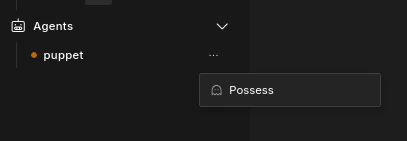
Built-in Debug Agents
Coral Server includes several built-in agents that we use internally for testing and debugging:All of these agents are hardcoded - they do not make any LLM completion requests
echo
- Automatically responds to any message it receives in its lifetime.
tool
- Calls a given tool when started.
- Useful for testing custom tools or for kick starting activity in other agents.
seed
- Automatically sends messages across a given number of threads at a set interval.
puppet
- Does nothing on its own.
- Serves as a “socket” for easily interacting with your session via the Puppet API.
GraphAgentRequest like any other agent.
Common Debugging Scenarios
Verifying Agent Connections
If an agent is not responding, check the agent’s status in Coral Console to ensure that the agent has successfully been started & connected to the Coral Server’s MCP. If the status isNot connected or Stopped, check the agent logs for errors.
Isolating Agent Interactions
To test an individual agent’s logic, create a session that includes only that agent and one or more debug agents (like thepuppet agent). This allows you to test the agent’s behavior in a controlled environment without the complexity of a full multi-agent graph.